

How to Connect LoRaWAN Devices to a Cloud Dashboard
|
Connecting LoRaWAN devices to a cloud dashboard can unlock powerful insights and automation capabilities for IoT applications.
However, the reality is that setting up a LoRaWAN network, integrating it with a cloud platform, and building a working dashboard from scratch can be extremely complex and time-consuming.
Many developers underestimate the complexity involved — from configuring network servers and codecs to setting up secure communication channels and creating a dashboard interface.
This is why integrated solutions like MobiusFlow exist — to simplify the entire process and eliminate the need for months of coding and infrastructure setup.
In this article, we’ll explain how you can connect LoRaWAN devices to a cloud dashboard efficiently, why using an integrated solution like MobiusFlow is the smarter choice, and how it compares to trying to build it yourself using platforms like AWS and Azure.
Why connect LoRaWAN devices to the cloud?
LoRaWAN (Long Range Wide Area Network) enables low-power devices to communicate over long distances, but the real value comes from processing and visualizing this data in real-time.

By connecting your LoRaWAN devices to a cloud-based dashboard, you can:
However, the challenge lies in getting from a connected device to a functioning cloud dashboard without getting bogged down in technical complexity.
The challenge with traditional LoRaWAN and cloud setups
While platforms like AWS IoT Core and Azure IoT Central are often mentioned in IoT discussions, they are not complete solutions for LoRaWAN-based IoT networks.
❌ 1. No built-in LoRaWAN support
AWS and Azure do not have their own LoRaWAN stack — you still need a network server like TTN, ChirpStack, or MobiusFlow to handle the LoRaWAN part.
❌ 2. No native IoT dashboard or data storage
AWS and Azure are essentially infrastructure platforms — they don’t provide built-in IoT data storage or visualization.
You would need to:
- Write your own application
- Build custom APIs
- Develop a web app
- Configure a database
- Handle security (e.g., TLS, certificates)
❌ 3. Lack of Plug-and-Play compatibility
Setting up a LoRaWAN network using TTN or ChirpStack means configuring frequency bands, regions, and device profiles.
Each sensor type requires a specific codec — if not configured properly, the data will be unreadable.
❌ 4. No easy automation or Rule-Based actions
AWS and Azure allow you to store and process data, but they don’t provide built-in tools for automation.

Why MobiusFlow simplifies LoRaWAN integration
Unlike AWS or Azure, MobiusFlow is designed specifically for LoRaWAN and IoT applications. It includes a built-in LoRaWAN stack and a ready-to-use dashboard, so you don’t need to spend months building infrastructure.
✅ 1. Built-In LoRaWAN stack – No external setup needed
- MobiusFlow includes its own LoRaWAN stack — no need to set up TTN, ChirpStack, or other third-party services.
- Sensors connect directly to MobiusFlow without additional configuration.
- Codec management is automated — MobiusFlow handles payload decoding without custom scripts.
✅ 2. Native IoT dashboard – No coding required
- MobiusFlow includes a fully functional cloud dashboard out of the box.
- You can set up charts, graphs, and custom visualizations with just a few clicks.
- No need to write custom APIs or build a separate web app.
✅ 3. Real-Time data processing and automation
- MobiusFlow processes data in real-time at the edge or in the cloud.
- Built-in automation tools allow you to set up rule-based triggers (e.g., send an alert if temperature exceeds a threshold).
- No need to write custom logic or manage a separate event engine.
✅ 4. Secure and scalable
- End-to-end encryption with TLS ensures secure communication.
- Fine-grained access control allows you to manage device-level permissions.
- Scales from a single device to thousands of connected devices without additional infrastructure.

How to connect LoRaWAN devices to a cloud dashboard with MobiusFlow
Instead of juggling multiple platforms and writing custom code, you can simplify the entire process with MobiusFlow:
Step 1: Connect your LoRaWAN devices
MobiusFlow includes a built-in LoRaWAN network server.
Simply register your device using its DevEUI, and MobiusFlow will handle the connection.

Step 2: Decode the data automatically
MobiusFlow automatically applies the correct codec based on the device type.
No need to write custom scripts to decode payloads.
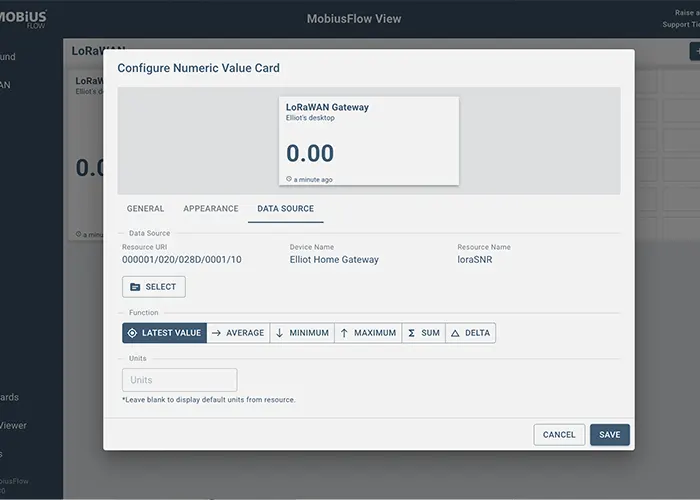
Step 3: Create a dashboard in minutes
Use MobiusFlow View to create custom charts and graphs.
Set up alerts, thresholds, and rules without writing code.
Step 4: Automate responses
Create rule-based automation directly in the MobiusFlow interface.
Trigger alerts, adjust device settings, or initiate workflows based on real-time data.
Why integrated solutions like MobiusFlow matter
Building an IoT solution from scratch using AWS or Azure requires:
- Deep programming knowledge (Python, JavaScript, etc.)
- Infrastructure management (Docker, Nginx, TLS)
- Database design and deployment
- API development and user authentication
- Security configuration and certificate management
With MobiusFlow, all of this complexity is handled for you.
MobiusFlow stands out with its:
- Native LoRaWAN stack (Datacake still relies on external LoRaWAN servers)
- Flexible automation and rule-based processing
- High scalability and security
Best use cases
✅ Smart Agriculture – Monitor soil moisture, weather, and crop health in real time.
✅ Industrial Automation – Track machine performance and enable predictive maintenance.
✅ Smart Cities – Manage street lighting, traffic, and environmental sensors.
✅ Environmental Monitoring – Detect air quality, water levels, and seismic activity.
✅ Logistics – Track shipments and manage warehouse assets.
Connecting LoRaWAN devices to a cloud dashboard doesn’t have to be complicated — but using platforms like AWS, Azure, or TTN can make it far more difficult than it needs to be.
Instead of months of coding and configuration, you can be up and running in hours.
👉 Ready to simplify your LoRaWAN deployment? Discover how MobiusFlow can help you create a scalable, secure IoT network with minimal effort.
